URGENT REMINDER: YOU NEED TO CHANGE THE SETTINGS IN EACH COURSE SO THAT THE GRADE AVERAGES ARE NOT DISPLAYED TO PARENTS / STUDENTS
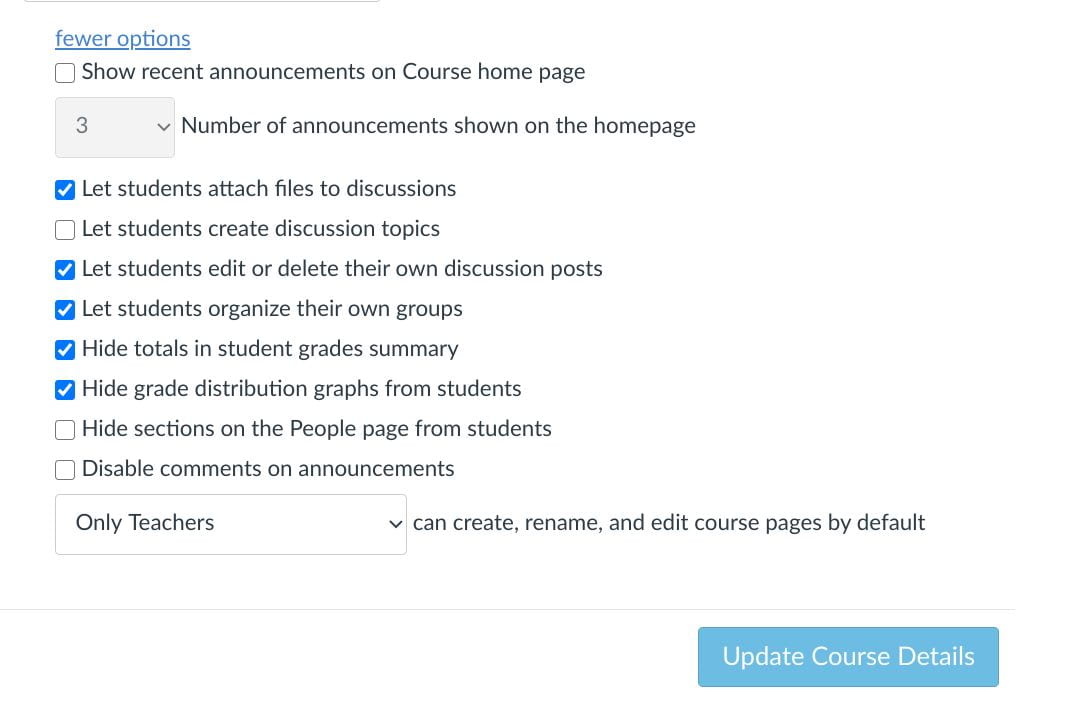
URGENT REMINDER: YOU NEED TO CHANGE THE SETTINGS IN EACH COURSE SO THAT THE GRADE AVERAGES ARE NOT DISPLAYED TO PARENTS / STUDENTS
Both administrators and teachers can do this from the course roster of any course. There is a different lesson on how to add/drop students from courses.
Google Docs is ever-improving. Watch this video to learn how to quickly convert a long URL into a clickable title. You’ll also learn about Google’s new preview pane, which allows