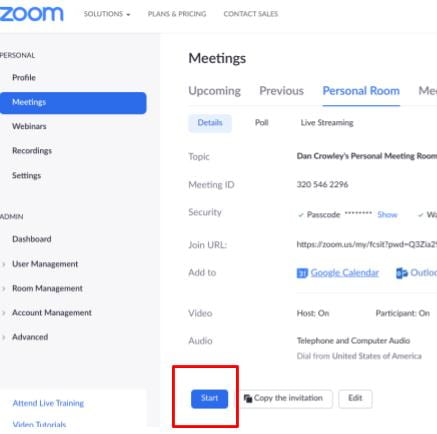
How to Start your Zoom Meeting September 10, 2020September 10, 2020| dcrowleydcrowley| 0 Comment| 6:14 pm Categories: Faculty Sign into Zoom.us Go to Meetings – Personal Room Click the Start Button Here is a video walkthough! Post navigation PREVIOUS Previous post: Post an Assignment with No Submission TypeNEXT Next post: Set up an in-class Writing Assessment in Canvas Related Post How to set up and use Kami with CanvasHow to set up and use Kami with Canvas August 7, 2022August 7, 2022| dcrowleydcrowley| 0 Comment| 3:27 pm Install the Kami extension: Install the Kami for Google Chrome extension here. Sign up or log in to Kami: To open Kami, click the extension from your browser, or head Read MoreRead More Recommended Zoom Security SettingsRecommended Zoom Security Settings September 18, 2020September 18, 2020| dcrowleydcrowley| 0 Comment| 3:02 pm Read MoreRead More Ruvna 101Ruvna 101 October 21, 2021October 21, 2021| dcrowleydcrowley| 0 Comment| 3:18 pm Sign Up For Notifications How to Check in Students from other Classes Read MoreRead More
How to set up and use Kami with CanvasHow to set up and use Kami with Canvas August 7, 2022August 7, 2022| dcrowleydcrowley| 0 Comment| 3:27 pm Install the Kami extension: Install the Kami for Google Chrome extension here. Sign up or log in to Kami: To open Kami, click the extension from your browser, or head Read MoreRead More
Recommended Zoom Security SettingsRecommended Zoom Security Settings September 18, 2020September 18, 2020| dcrowleydcrowley| 0 Comment| 3:02 pm Read MoreRead More
Ruvna 101Ruvna 101 October 21, 2021October 21, 2021| dcrowleydcrowley| 0 Comment| 3:18 pm Sign Up For Notifications How to Check in Students from other Classes Read MoreRead More